
Smart Home · Brisbane

Smart-home security
that actually works.

Temporary codes for the cleaner, two-way audio for the courier, facial recognition with a key as backup. Brisbane smart-home installs designed around how you actually live — Akuvox + AJAX + Dahua integrated, one app, no second-app shuffle.

5.0☆
190 Google reviews
1 App
Akuvox + AJAX unified
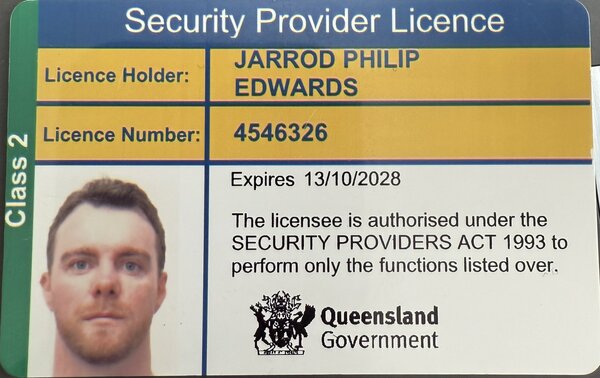
Class 2
QLD Security Licence
1 Year
Installation warranty
3 Year
Free remote support

Smart Home Security Features — Brisbane Akuvox + AJAX Integration

Smart Home Security Features Brisbane — Akuvox + AJAX + Dahua Integration

A “smart home” stops being a gimmick the day your house decides to do useful things automatically without you touching anything. For security, that’s cameras that arm at sundown, alarms that disarm when you pull into the driveway, intercoms that recognise the babysitter, and lights that pulse the colour red when motion is detected outside at 3am.

Mr Secured installs and configures three best-in-class platforms that play nicely together: Akuvox intercoms, AJAX wireless alarm, and Dahua CCTV. This page covers what each does, how we link them, and what the actually-useful smart automation looks like in a Brisbane home.

The three-platform stack

PlatformRoleSmart featuresIntegration
AkuvoxVideo intercom + door releaseFace recognition, app forwarding, temp PIN codes, package delivery alertsHomeKit (newer models), SmartPlus cloud, Home Assistant
AJAXWireless alarm + sensorsGeofence arm/disarm, scenario triggers, video verification, dual-path commsApple Home, Google Home, Alexa, Home Assistant
DahuaCCTV + AI detectionPerson/vehicle AI, ANPR, line crossing, dewarping, P2P streamingHomeKit Secure Video, Home Assistant, ONVIF

Useful smart automations we set up

1. Drive-up auto-disarm

Your phone’s geofence enters a 100m radius around home. AJAX detects this via Bluetooth proximity to the alarm panel (or via cloud geofence on Hub2 Plus). System disarms automatically. You walk in without keying a code. If your spouse arrives first, the alarm is already disarmed by their geofence — no double-trigger.

2. Sundown camera arming

At civil twilight, Dahua cameras switch to night mode with IR + tripwire AI detection on perimeter cameras. Sensitivity ramps up between 9pm-6am. Push notifications go from “all motion” during the day to “person only” overnight, eliminating possum/cat false positives.

3. Doorbell face recognition

Akuvox X912S or R29 stores up to 20 known faces (family, regular visitors, cleaners). Door call rings differently for known vs unknown faces — known face = soft chime, unknown = full alarm-style ring + auto-record. Useful in apartments where you want to know if it’s family or a random visitor.

4. Tradies’ temp PIN with auto-revoke

Cleaner arrives every Tuesday 10am-12pm. AJAX gets a time-bound PIN that only disarms during that window. Akuvox intercom gives them a 4-digit door code valid the same window. After 12:01pm, both codes deactivate. No app permission needed, no key handover.

5. Package delivery alert

Camera detects a person at the front door with package-shape AI (Dahua “package detection” model). Pushes notification with snapshot. If left more than 4 hours, second notification fires — useful for theft prevention or just remembering to bring it in before rain.

6. Night-time motion = pulse hallway lights red

Connecting AJAX motion sensors to Philips Hue (via Home Assistant or Apple Home) lets the lights flash red when overnight motion is detected outside. Useful for elderly residents — visual alarm without waking the whole house.

7. CCTV record-on-alarm

AJAX alarm triggers Dahua NVR to bump recording quality to 4K + 30fps for 5 minutes either side of the alarm event. Default recording is 2MP at 15fps to save space; alarm events get the high-fidelity treatment.

The integration layer choice

Smart home integrations can be done three ways, each with trade-offs:

Apple HomeKit / Apple Home

Cleanest UX for iPhone/iPad families. AJAX has native HomeKit support; Dahua works via HomeKit Secure Video on newer models; Akuvox SmartPlus has limited HomeKit hooks. Best for: families fully on Apple. Limitation: Apple-only.

Home Assistant (HA Green or Pi)

Most powerful, fully cross-platform. ~$650 installed including the HA hardware box. Best for: technically inclined, multi-platform households, or you want very specific automations (e.g., “only arm cameras if all family phones are off Wi-Fi”). We do this build often.

Google Home / Amazon Alexa

Voice assistant integration (“Hey Google, arm the house”). AJAX has Google Home native; Dahua via DMSS skill. Cheaper than HomeKit/HA but less flexible automation logic.

What to avoid in smart home security

Cloud-only consumer brands

Ring, Nest, Arlo — all force you through their cloud, raise prices over time, can cancel features (Ring removed lifetime cloud in 2020, forcing $40-100/year subscriptions for features that were previously included). Pro-grade gear (Dahua, AJAX, Akuvox) is owner-controlled; the apps are free.

Single-app lock-in

If your security is locked to one app and that company has an outage, you lose remote control. Pro stacks have multiple independent layers (DMSS + AJAX + SmartPlus). One cloud down ≠ everything down.

Voice-only unlock

Don’t enable voice-only door unlock. Anyone outside the house can shout commands through windows. Always require a PIN, biometric, or app confirmation.

Quote a Brisbane smart-security install

FAQ

What’s the cheapest smart home security setup for a Brisbane home?

Starting point: 4-camera Dahua CCTV ($2,200) + AJAX Hub2 + 4 sensors ($1,800) + Akuvox E12 video doorbell ($1,250) = ~$5,300 supplied + fitted. App control included, no monthly fees, no cloud lock-in.

Does smart home security work without internet?

Local features (CCTV recording, alarm arm/disarm via panel, intercom local answer) all work offline. Remote viewing and notifications require internet. AJAX alarms with 4G failover keep reporting even on full NBN outage.

Will smart home security work in 5+ years?

The brands we install (Dahua, AJAX, Akuvox) all have 5+ year firmware update commitments. Hardware lifecycle is 7-10 years in normal use. Apple Home and Home Assistant have multi-year stability. Consumer brands (Ring, Nest, Eufy) have a less predictable track record.

Can the integrations be hacked?

Pro-grade integrations use end-to-end encryption with industry-standard cipher suites. The biggest practical risk is weak app passwords on family devices — we enforce 2FA on every account at install handover.
Most “smart” homes are a pile of disconnected apps.

Ring for the doorbell. Yale for the lock. Arlo for the cameras. A separate hub for the alarm. Half a dozen subscriptions. Three different ways to give the cleaner access. Every device works on its own — nothing actually talks to anything else.

Mr Secured installs smart-home stacks that share one ecosystem: Akuvox intercoms with SmartPlus credentials, AJAX Hub 2 alarm with multi-zone arming, Dahua cameras integrated into the same dashboard. Tradies get a one-time code, deliveries get two-way audio, family members get facial recognition with a physical key as backup. One app for the household.

Six smart-home capabilities we install across Brisbane.

The features people ask for most — designed to coexist on one platform, not bolted together after the fact.

01 · Access codes

Temporary codes for tradies, cleaners, sitters

Generate a time-limited code for the dog-walker, the painter, the housekeeper. Set start & end time. See exactly when they came in. No spare keys, no lock-box scrum.

  • Akuvox SmartPlus time-bounded PINs
  • Per-person event logs in the app
  • Auto-revoke when the booking ends
See Akuvox →
02 · Two-way audio

Doorbell two-way audio for couriers

Talk to the courier from the office. Tell them to leave the parcel behind the planter. See them, hear them, answer them from your phone without unlocking anything.

  • Akuvox A02 door station full-duplex audio
  • Push-to-talk on the app, ring on the indoor monitor
  • Snapshot recording on every press
See Akuvox →
03 · Facial recognition

Facial recognition + physical key backup

Walk up, the door unlocks. No phone, no fumble. Family members enrol once and walk through — but the physical key still works for anyone who isn’t enrolled, so guests, grandparents and emergencies stay covered.

  • Akuvox X915 / R29 facial-recognition station
  • Physical key + PIN as parallel credentials
  • Up to 5,000 face templates locally stored
Talk credentials →
04 · AJAX zone control

Arm + disarm AJAX alarm from the Akuvox monitor

One panel, both systems. Tap to arm the perimeter at night, tap to disarm when you wake up — from the same indoor monitor you use for the intercom. No second app, no separate keypad. (Watch the demo video on the Akuvox page.)

  • Akuvox S562 indoor monitor + AJAX Hub 2 integration
  • Per-zone arming (perimeter / interior / sleep mode)
  • Multi-user notifications
Watch the demo →
05 · Camera AI

Dahua AI cameras with person / vehicle tuning

Stop getting pinged every time a leaf moves. ColorVu cameras with on-device AI ignore swaying branches and trigger only on actual people or vehicles. You get the alerts that matter, not the ones that drown the others.

  • Dahua WizSense intrusion + tripwire rules
  • ANPR plate recognition on driveway camera
  • Mobile push alerts via DMSS
Talk camera AI →
06 · One app

Unified family access & per-user scopes

Different family members see different things. Parents get full control. Kids get camera viewing but no system disarm. The cleaner sees nothing except the code that lets them in. App permissions scoped to the household.

  • Per-user role permissions across Akuvox + AJAX
  • Separate notifications per person
  • Centralised setup, household-level billing
Talk app setup →

Real Brisbane smart-home installs.

Anonymised by suburb. Specific configs — this is exactly what we installed.

Hamilton townhouse

Two-way doorbell + cleaner code + AJAX integration

Akuvox A02 door station, S562 monitor, AJAX Hub 2 wired to the same dashboard. Cleaner gets a Mon/Wed/Fri PIN that auto-revokes. Owners disarm the alarm by tapping the intercom screen.

New Farm apartment

Facial recognition entry + physical key for guests

Akuvox X915 at the unit door. 4 face templates for the family, traditional key still active. Building intercom integrated into the same Akuvox SmartPlus account. One app, two access tiers.

Indooroopilly home

ANPR driveway + per-user camera viewing

Dahua ANPR camera at the gate, WizSense intrusion rules across 8 cameras, AJAX MotionProtect on every external door. Parents get full app access; kids see cameras only. Cleaner gets a PIN window.

Smart-home FAQs.

Can you set up temporary access codes for tradies and cleaners?

Yes. Akuvox SmartPlus lets us issue time-bounded PINs — you pick the start and end time, the code works only in that window, and the app logs every entry. You can revoke instantly from the phone if plans change.

Does the doorbell support two-way audio for couriers and delivery?

Yes — full-duplex two-way audio is standard on the Akuvox A02, A08 and A094 door stations. You answer from the app or the indoor monitor, talk to whoever’s at the door, and direct them where to leave the parcel. Snapshot is saved on every press.

Can you combine facial recognition with a physical key as backup?

Yes. Akuvox X915 and R29 stations support facial recognition for enrolled family members AND a parallel physical key / PIN for everyone else. You never lock yourself out because the camera didn’t recognise you, and guests/grandparents still get an obvious access path.

Can the alarm and intercom genuinely be one system?

Yes — AJAX Hub 2 integrates into Akuvox S562 indoor monitor, so you arm and disarm the alarm directly from the intercom screen. See the demo video on our Akuvox brand hub.

Can different family members see different things in the app?

Yes. Per-user role permissions across both Akuvox SmartPlus and AJAX PRO Desktop. Parents get system control; kids get view-only or specific cameras; the cleaner sees nothing beyond their code. Configured at handover.

Will the camera AI stop nuisance alerts?

Yes. Dahua WizSense AI runs person / vehicle / face filtering on-camera, so rules trigger only on actual humans or cars — not branches, possums or rain. We tune the rules at install + during the 3-year support period as the property changes.

Can I add this to a system I already have?

Usually yes — if your existing cameras are ONVIF and your alarm hub has Modbus / Ajax integration we can layer the smart-home features on top rather than replace. See the retrofit CCTV page for the full framework.

What’s the warranty and ongoing support?

1-year installation warranty plus 3 years free remote support (firmware, app help, AI tuning). Hardware: Dahua 3 yr, AJAX 5 yr, Akuvox 3 yr (AU back-to-base). See warranty + support.

Stop juggling four apps. Run the house on one.

Tell us how you actually use the house — cleaner schedule, delivery patterns, who needs what access — and we’ll spec the smart-home system that fits. Free site walk, designed quote in a week, one app from day one.

CCTV Installation — Brisbane Suburbs

Gold Coast

Sunshine Coast

Ipswich & Logan

Commercial Security — Service Areas

View all service areas →

QLD Security Provider Licence - Class 2 - Licence No. 4546326 - Jarrod Edwards

Licensed, Insured & ASIAL Accredited

QLD Security Provider Licence · Class 2 · No. 4546326

ASIAL Member · $20M Public Liability — Security Installation Cover

Mr Secured Pty Ltd · ABN 63 663 085 505